
A complete Guide on how to use NotebookLM as a language learner
What has now become my favorite language learning tool

When NotebookLM came out in late 2023, I was amazed at the possibilities it could offer for language learners… only to be disappointed by the fact it only worked in English. With time, however, NotebookLM has received multiple incredible updates that have turned it into the main AI tool I now use as a language learner.
I’ve wanted to write about how I use it and the many other ways you could use it for a long time but kept pushing it back as I wanted to make it the most comprehensive possible. Unfortunately—or fortunately?—, with all its evolutions, it feels like I’ll never catch up so here’s likely the first of many pieces I’ll write about it.
Let’s stop for a moment and tackle the most important question.
What is NotebookLM
As it states on its main page,
Meet NotebookLM, the AI research tool and thinking partner that can analyze your sources, turn complexity into clarity and transform your content.
Well, that’s not helping so let me try to be clearer.
NotebookLM’s original “selling” point1 is that it could turn any source (text, webpages, videos from YouTube, files uploaded) into a short lively podcast strictly based on your sources.
It’s now evolved into much more though.
Once the notebook is created, you can not only create a podcast but also prompt it to focus on certain aspects of your sources and choose whether you want it to be a Deep Dive, a Brief, a Critique, or a Debate.
If you choose English or some languages like French as the target language, you can even make it “Long” and get a 40-50 minute podcast! 😮
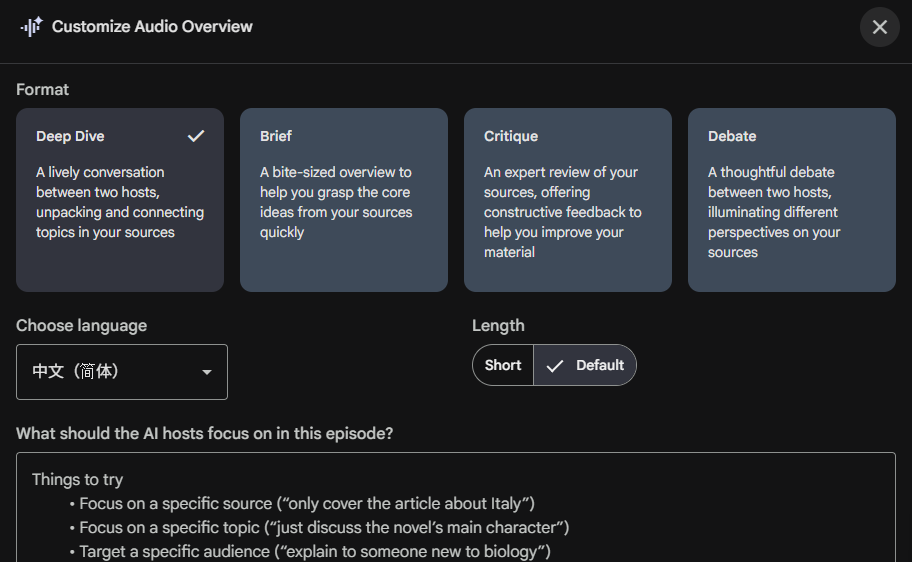
We’ll dive into this later since there are also other features to know of:
Video Overview: Creates a 5-7 minute-long video serving either as an Explainer or a Brief to learn some basics on your sources
Mind Map: Creates a mind-map with the key ideas from your sources. Great for digging into specific parts
Reports: Creates a report about the topic
Flashcards: Creates a small deck of flashcard to test your knowledge about the content
Quiz: Creates a multiple-choice quiz to test your knowledge too
Infographic: Creates a one-page document with the main ideas
Slide deck: Creates a PPT-like presentation to get some visuals with your content
Data table: Creates a data table, which is great for analysis but not much for language learning as far as I know.
This would already be quite good but it doesn’t stop here. There’s also a chat in the middle of the canvas to dig deeper and ask questions about the sources. This is what matters most though: it precises which source says what and adds a link to it if you want to verify.
This simply acts avoids too many hallucinations and brings trust into the picture.
I could go on for a while but let’s not beat around the bush any more.
Why this is an incredible tool for language learners, heh?
Unlimited audio content
One of the main problems when we want to improve our listening comprehension is the sea of choices.
Should we watch a new YouTube video? Find another podcast episode? Rewatch a movie or TV show? Listen to more music? All are valuable options.
As a beginner learner, exposing our ears to a variety of audio is an incredible tool to get used to the sound and rhythm of the language. Once that’s done, however, the variety can work against us.
A variety of topics also means the words and expressions change a lot. Context helps with understanding but it doesn’t allow us to cement words in our brain.
NotebookLM solves that problem.
Let’s say you love the game of Go. Well, you can ask NotebookLM to find sources about the game of Go and create a podcast in your target language. You can choose first to have a Brief so it’s not overwhelming to work through. You can then request a longer version and then again another one a specific topic such as playing on a 19x19 board instead of 13x13. Finish up with a Debate about opening moves and you’re golden.
By reusing the same sources and creating multiple podcasts, you get to hear the same keywords in different sentences, said by the man or woman, with different intonations. This reinforces the vocabulary through exposure.
Dig deeper with other tools
AI podcasts were the part mainly put forward by NotebookLM originally but the other tools added are nothing to look down on!
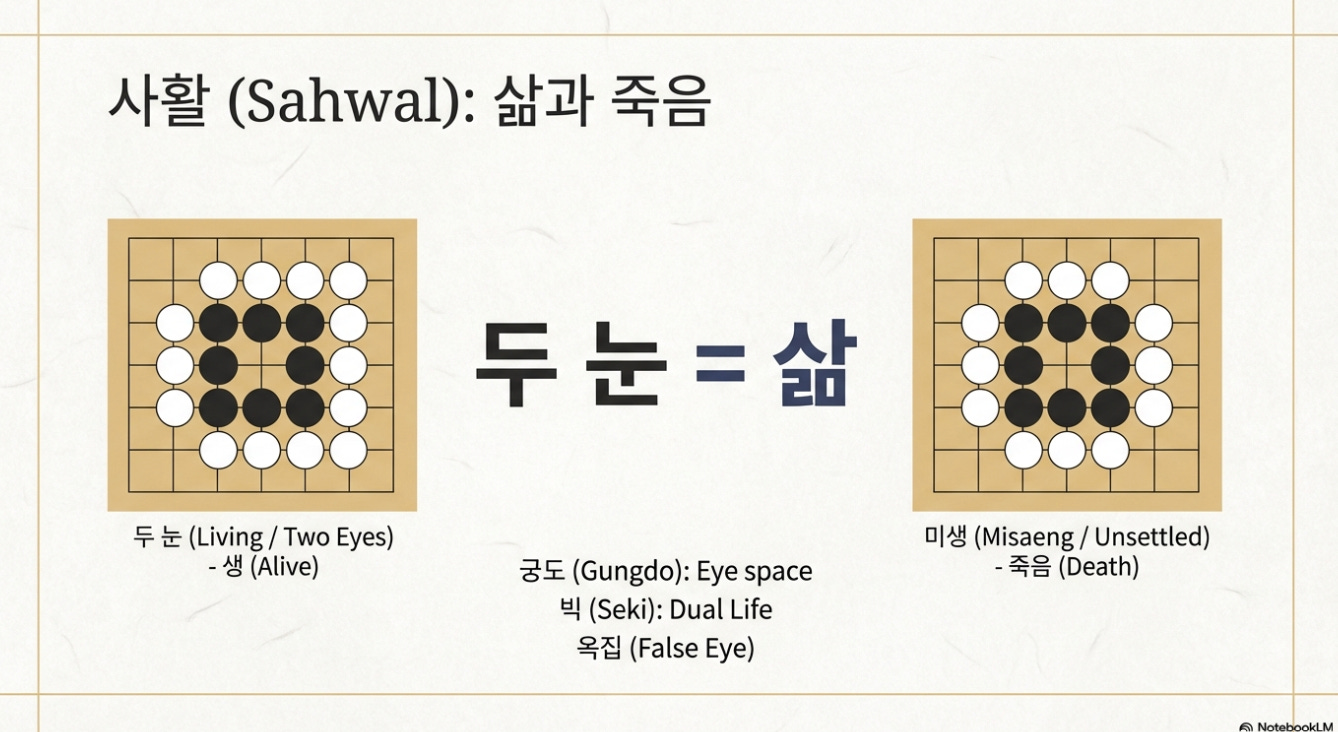
While I’ve found the video overview, slide deck, and infographics rather dull (and even showing completely wrong Go boards exemples!), the rest is worth looking into.
First, I find the Reports to be the best “summary” of dozens of sources. They are usually a few hundred words/characters and well organized. As such, they can be a great tool to study through the topic and discover key vocabulary ahead of listening to a podcast.
The Flashcards and Quiz are a good way to test yourself on the knowledge you acquire through the study of podcasts or reports. I personally prefer the Quiz because it’s a multiple choice system and, if you click on the wrong answer, you get a one-sentence explanation of why this wasn’t the correct sentence and why you should have chosen the correct one.
Finally, the Mind Map is likely the most useful tool to dig deep into the topic. It can help you go from “knowing” about the topic to mastering it truly.
On its own, the mind map only shows keywords but if you click on them, it open the chat in the middle and provides a details explanation of that specific point.
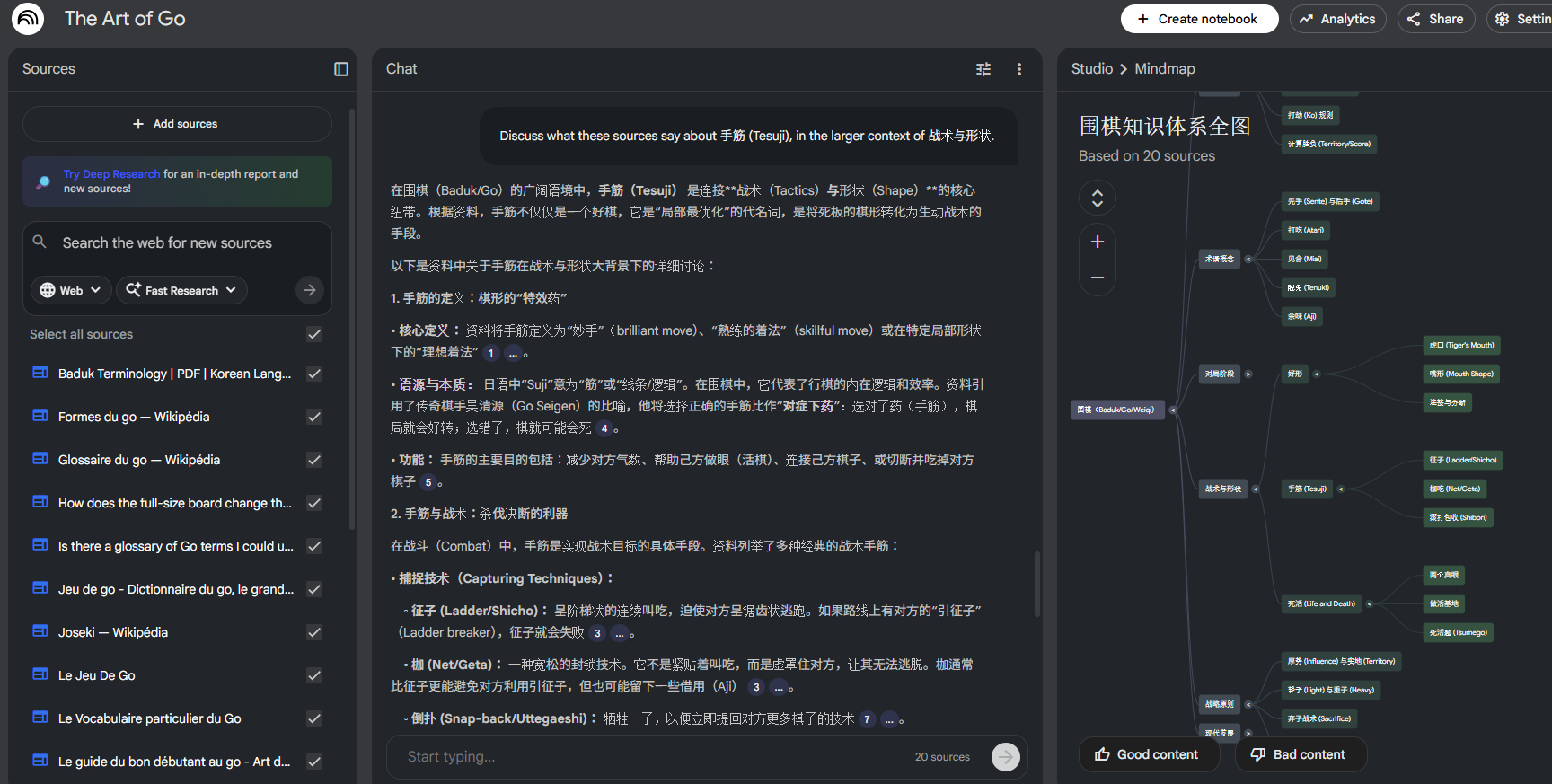
Sure, that can be overwhelming at first but I find it to be a good last step before testing myself and moving on to another topic.
Using NotebookLM in original ways
I love to play around with AI tools to find ways it was not planned to be used. NotebookLM is no exception. Like others AI tools, it shines when used in new ways.
Last year I began reading a short graded reader in Chinese. I wanted to use the dictionary as few times as possible so before diving in, I added the audio into NotebookLM and requested a few things in that order:
A 1-min brief podcast in Chinese to get the gist in the target language needed
A 10-min podcast explaining the story in another target language I speak well: Korean
A 10-min podcast explaining the story in Chinese
I then listened to each 3-4 times through out the days I was reading the story. This combination allowed me to recognize more words in Chinese as I kept going. Here’s the Chinese brief if you’re interested:
This worked well because I had the audiobook version of that graded reader, but you can also use that to work on long texts you find online and help,
Get used to reading the news
Work on long texts online such as short stories or even papers if you’re at that level
Another useful way to use this tool is also for audio files you may have without transcript. After adding that file (or link if it’s a YouTube video for instance) as a source in NotebookLM, it automatically creates a transcript of the entire audio for itself to refer to. The this is, you can click on the source and see that transcript too!
I’ve even once downloaded a podcast I had created with NotebookLM and added it as a source to see the transcript as I listened to it again.
Since you only get a few podcast creations per day as a free user, you may have to be careful what you want to create. But adding a source doesn’t count as requesting anything from it so you can do it as often as you like! 😁
I’m sure there are more original ways to use it so if you have some, please let me know!
NotebookLM as a language learner
Some people say AI will kill language learning. I reckon fewer people will try it indeed. That’s a real shame for sure. But I’m also sure more people who will start learning foreign languages will keep at it and actually become proficient to the level they aim for.
This piece is only about NotebookLM but look at all it can already do!
Provides unlimited audio content about topics you choose → Great for listening practice 🔉
Provides unlimited written content to work through → Great for intensive reading practice 📖
Helps get transcripts for audio files → Great for bimodal input and especially for languages with a different script such as Chinese, Japanese, etc. 📖🔉
Helps practice writing in the chat to ask questions → Great for writing ✍️
Provides unlimited testing options → Great to verify you actually learned about the topic 🧠
Downsides of NotebookLM
Now, it’s not perfect. Nothing is.
As I mentioned earlier, the video overview, infographic and slide deck options are potentially good tools but I don’t believe NotebookLM is there yet when it comes to visuals. There are often typos, and images may actually lie
I’ve switched from the paid version of ChatGPT to Gemini late last year so I don’t have that anymore, but the free tier limits you to only a few podcast creations per day.
In a way, that’s useful not to overwhelm yourself. But it also limits you as you must choose what you generate carefully. And if you’re not satisfied, well, tomorrow will come soon enough.
I also find it a bit restrictive that you cannot change the voices at all. They’re not bad but some variety wouldn’t hurt.
Another “downside” is an incredible option that currently only exists only in English: jumping in. If you generate an English podcast, you can interrupt the speakers to ask “them” to explain more clearly a point of focus on something else. Once this is added to other languages, this will make NotebookLM a great tool to practice speaking too! 🗣️
Finally, there used to be a button “Discover Sources” which was great to let NotebookLM choose a random topic. This seems to have been replaced with a search web interface. It isn’t so bad because at least you don’t end up on strange topics you’re not interested in, but I kinda liked the surprise too.
Final thoughts
I’ve shared a lot and still feel like I’ve only scratched the surface.
NotebookLM is, by far, my favorite tool now.
I use it daily whether to just get some listening practice or review some vocabulary in a topic I’ve studied.
Sure, it’s might feel overwhelming for beginners or for first time users, but it’s worth starting early to get your ears used to the language and potentially dive into the topics you love most.
For intermediate and advanced learners, however, my god, why aren’t you using it yet! Hop hop! Get to it, here’s the link.2
Cheers for reading,
Mathias
I mean.. it’s free but you see what I mean
Gosh, that sounded like a sponsored sentence. Just in case you wonder: it’s not!